Developer Guide
Rapportbook Developer Guide
Welcome to the Rapportbook Developer guide!Rapportbook is a CLI-focused desktop app for managing client information, developed in Java 11. If you wish to contribute to Rapportbook, please go through this guide to familiarize yourself with Rapportbook.
Using this guide
If it is your first time contributing, make sure you follow the guidelines we have noted in Setting up, getting started. Please refer to the following list of sections to get you familiarized with Rapportbook.
-
Design overview – High level overview of the design and architecture Rapportbook
-
Implementation – Implementation details for the features currently implemented
-
Testing – Testing instructions and expected outcomes of the features in Rapportbook.
The following is the table of contents for Rapportbook.
- Using this guide
- Acknowledgements
- Setting up, getting started
- Design
- Implementation
- Documentation, logging, testing, configuration, dev-ops
-
Appendix: Requirements
- Product scope
- User stories
-
Use cases
- Use case: List contacts
- Use case: Add a contact
- Use case: Delete a contact
- Use case: Edit a contact
- Use case: List filters applied
- Use case: Filter clients
- Use case: Clear filters
- Use case: Show contact
- Use case: Create tag(s)
- Use case: Delete tag(s)
- Use case: List tag(s)
- Use case: Add tag(s) to contact
- Use case: Remove tag(s) from contact
- Use case: Generate message templates
- Use case: Reminder creation
- Use case: Reminder deletion
- Use case: Clear reminders
- Use case: Return to home page
- Use case: View motivational quote
- Use case: Request help manual
- Use case: Exit application
- Non-Functional Requirements
- Glossary
- Appendix: Instructions for manual testing
Acknowledgements
- This project is based on the AddressBook-Level3 project created by the SE-EDU initiative.
- Third-party libraries used:
Setting up, getting started
Refer to the guide Setting up and getting started.
Design
 Tip: The
.puml files used to create diagrams in this document can be found in the diagrams folder. Refer to the PlantUML Tutorial at se-edu/guides to learn how to create and edit diagrams.
Architecture
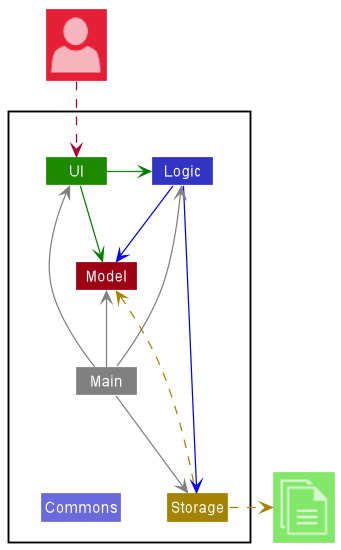
The Architecture Diagram given above explains the high-level design of the App.
Given below is a quick overview of main components and how they interact with each other.
Main components of the architecture
Main has two classes called Main and MainApp. It is responsible for,
- At app launch: Initializes the components in the correct sequence, and connects them up with each other.
- At shut down: Shuts down the components and invokes cleanup methods where necessary.
Commons represents a collection of classes used by multiple other components.
The rest of the App consists of four components.
-
UI: The UI of the App. -
Logic: The command executor. -
Model: Holds the data of the App in memory. -
Storage: Reads data from, and writes data to, the hard disk.
How the architecture components interact with each other
The Sequence Diagram below shows how the components interact with each other for the scenario where the user issues the command delete 1.
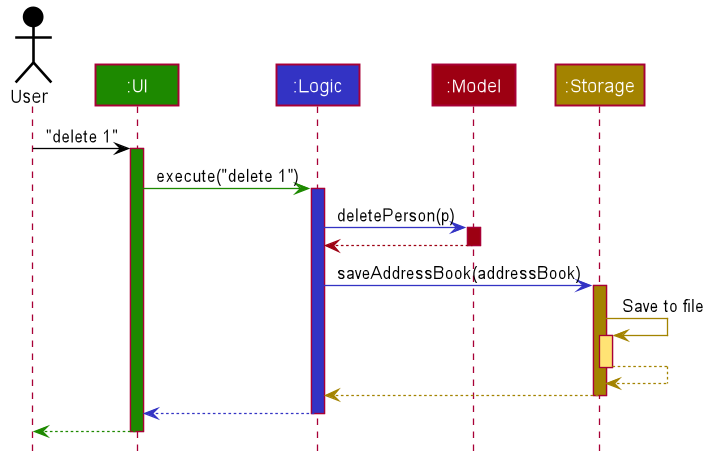
Each of the four main components (also shown in the diagram above),
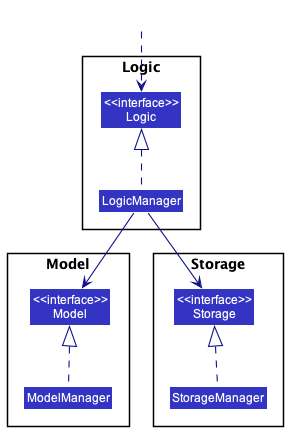
- defines its API in an
interfacewith the same name as the Component. - implements its functionality using a concrete
{Component Name}Managerclass (which follows the corresponding APIinterfacementioned in the previous point.
For example, the Logic component defines its API in the Logic.java interface and implements its functionality using the LogicManager.java class which follows the Logic interface. Other components interact with a given component through its interface rather than the concrete class (reason: to prevent outside component’s being coupled to the implementation of a component), as illustrated in the (partial) class diagram below.
The sections below give more details of each component.
UI component
The API of this component is specified in Ui.java
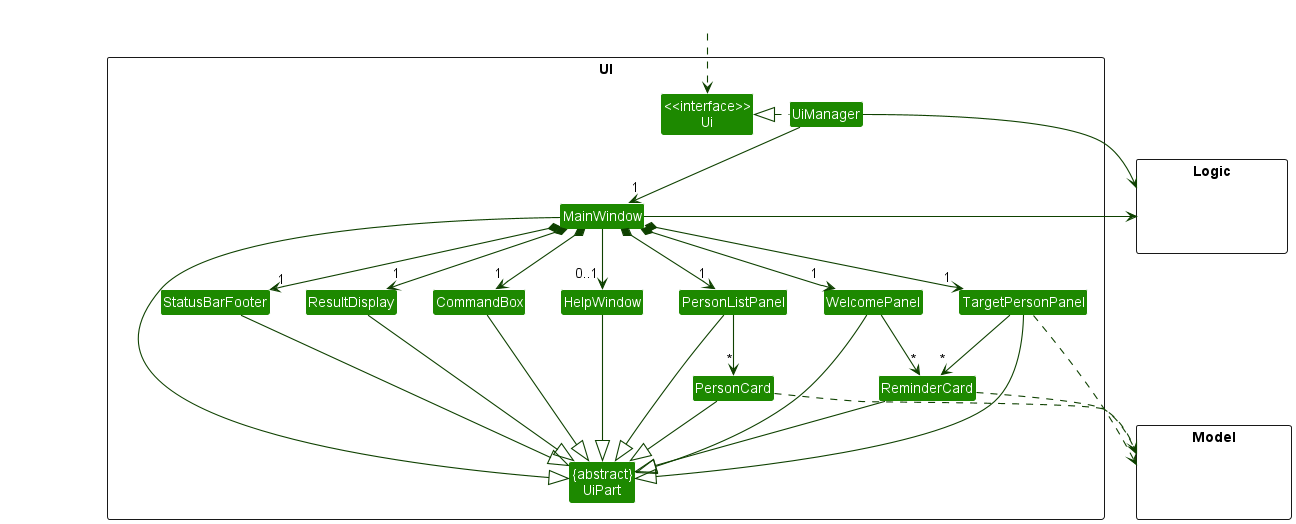
The UI consists of a MainWindow that is made up of parts e.g.CommandBox, ResultDisplay, PersonListPanel, StatusBarFooter etc. All these, including the MainWindow, inherit from the abstract UiPart class which captures the commonalities between classes that represent parts of the visible GUI.
The UI component uses the JavaFx UI framework. The layout of these UI parts are defined in matching .fxml files that are in the src/main/resources/view folder. For example, the layout of the MainWindow is specified in MainWindow.fxml
The UI component,
-
take user commands from
CommandBoxand executes user commands via theLogiccomponent.- The
UIcomponent therefore keeps a reference to theLogiccomponent, because theUIrelies on theLogicto execute commands.
- The
-
listens for changes to the data within the
Modelcomponent and updates the UI with any modified data.- This means that the
UIcomponent depends on some classes in theModelcomponent (for example,PersonCardandReminderCarddisplays information that is set in theModelcomponent).
- This means that the
Logic component
API : Logic.java
Here’s a (partial) class diagram of the Logic component:
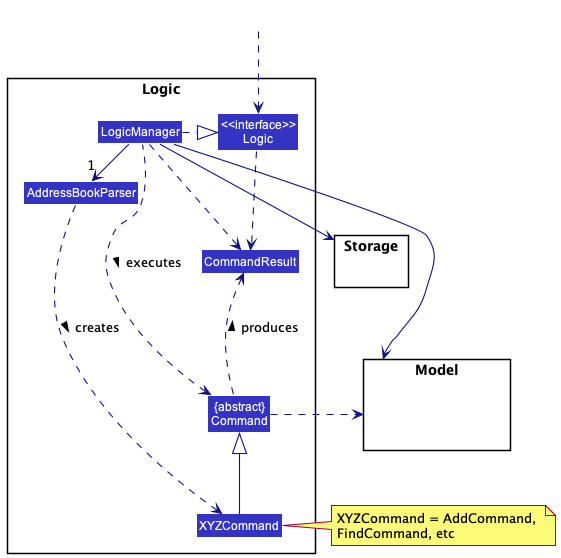
How the Logic component works:
-
When
Logicis called upon to execute a command, it uses theAddressBookParserclass to parse the user command. -
This results in a
Commandobject (more precisely, an object of one of its subclasses e.g.,AddCommand) which is executed by theLogicManager. -
The command can communicate with the
Modelwhen it is executed (e.g. to add a person). -
The result of the command execution is encapsulated as a
CommandResultobject which is returned back fromLogic.
The Sequence Diagram below illustrates the interactions within the Logic component for the execute("delete 1") API call.
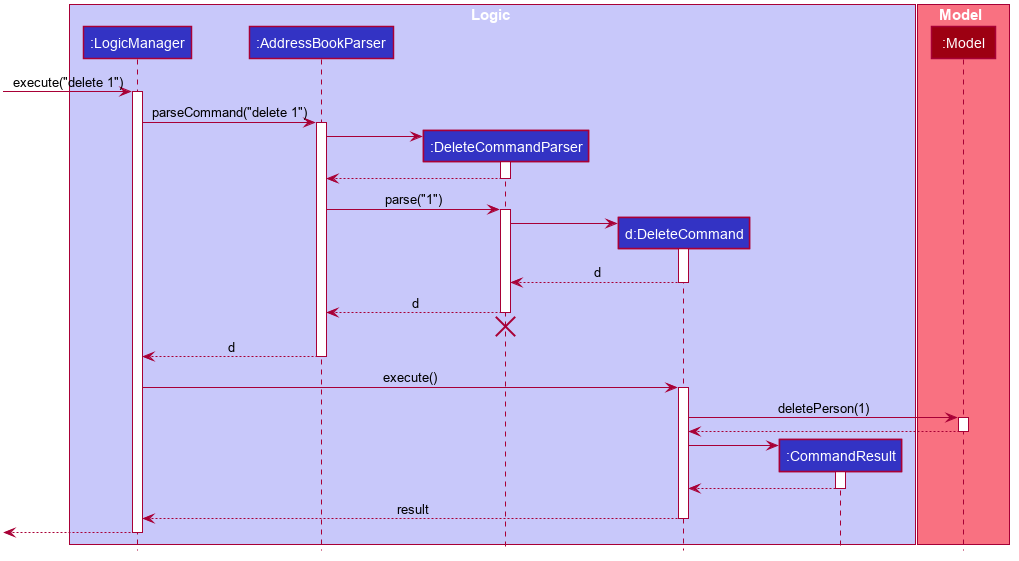
 Note: The lifeline for
DeleteCommandParser should end at the destroy marker (X) but due to a limitation of PlantUML, the lifeline reaches the end of diagram.
Here are the other classes in Logic (omitted from the class diagram above) that are used for parsing a user command:
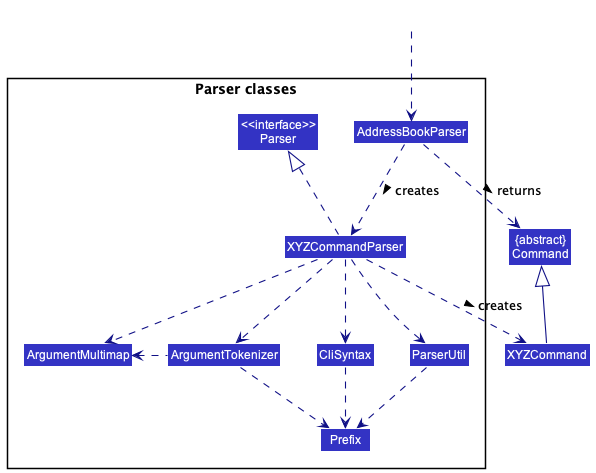
How the parsing works:
- When called upon to parse a user command, the
AddressBookParserclass creates anXYZCommandParser(XYZis a placeholder for the specific command name e.g.,AddCommandParser) which uses the other classes shown above to parse the user command and create aXYZCommandobject (e.g.,AddCommand) which theAddressBookParserreturns back as aCommandobject. - All
XYZCommandParserclasses (e.g.,AddCommandParser,DeleteCommandParser, …) inherit from theParserinterface so that they can be treated similarly where possible e.g, during testing.
Model component
API : Model.java
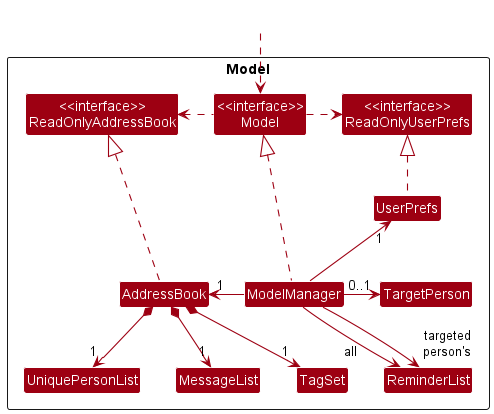
The Model component,
-
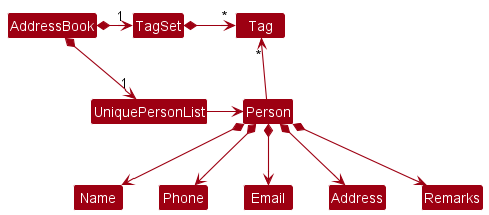
stores the address book data, which includes:
-
all
Personobjects (which are contained in aUniquePersonListobject). -
all
Tagobjects in a set (which are contained in aTagSetobject). -
all
Messageobjects in a List that represents the message templates (which are contained in aMessageListobject).
-
-
stores the currently filtered
Personobjects (i.e. results of afiltercommand) as a separate filtered list which is exposed to outsiders as an unmodifiableObservableList<Person>.- The
UIcomponent updates thePersonListPanelJavaFx component to match the components in theObservableListwhenever the data in the filtered list change.
- The
-
stores the currently selected
Personobject (i.e. result of ashowcommand) as aTargetPersonwhich is exposed as an unmodifiableObservableList<Person>.- Similarly, the
UIcomponent updates theTargetPersonPanelJavaFx component ot match the data that is in theObservableListwhenever theTargetPersonis changed.
- Similarly, the
-
stores a
UserPrefobject that represents the user’s preferences. This is exposed to the outside as aReadOnlyUserPrefobjects. -
does not depend on any of the other three components (as the
Modelcomponent acts as a “database” which represents data entities, and the data entities should work on their own without depending on other components)
Given below is the class diagram for the Person model.
Storage component
API : Storage.java
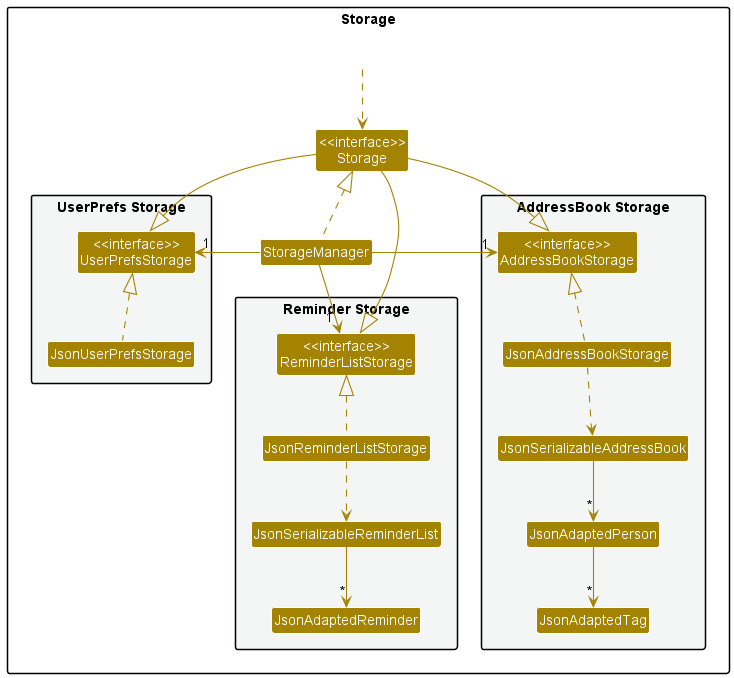
The Storage component,
-
can save both address book data, user preference data and reminder data in json format, and read them back into corresponding objects.
- inherits from
AddressBookStorage,UserPrefStorageandReminderListStorage, which means it can be treated as any of them (if only the functionality of only one is needed). - depends on some classes in the
Modelcomponent (because theStoragecomponent’s job is to save/retrieve objects that belong to theModel)
Common classes
Classes used by multiple components are in the seedu.addressbook.commons package.
Implementation
This section describes some noteworthy details on how certain features are implemented.
UI Design
Proposed Implementation
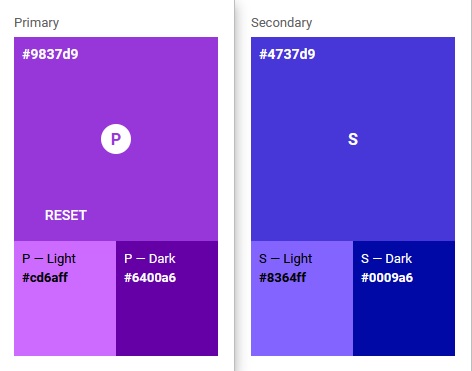
The proposed design for the UI is to follow the Material Design system as much as possible. However, due to limitations of JavaFx, we will only be mainly focusing on adhering the color system and typography, with the other foundations serving more of a guide for future component designs.
The main stylesheet can be found under resources/view/LightTheme.css. The primary color chosen is #9837d9, with the full color palette shown below.
Design considerations:
- Aspect: The application only supports a light theme
-
Alternative 1 (current choice): Only implement a light theme.
- Pros:
-
Most applications are light themed by default, thus only support light theme for consistency.
-
Only need to maintain one stylesheet.
-
-
Cons:
- User may have enabled system-wide dark mode, so the light theme of Rapportbook may not blend in with other applications nicely.
- Pros:
-
Alternative 2: Implement both light theme and dark theme and follow user’s system light/dark mode setting.
-
Pros:
- Current theme will blend in with other applications on the system nicely.
-
Cons:
- Extra manpower is required to maintain two different stylesheets.
- There is still no official way to detect system-wide light/dark mode setting in Java yet without the use of a third-party library.
-
Remark field for entries
Implementation
The proposed implementation for Remark is similar to that of other details of Person.
Firstly we include a Remark class under seedu/address/model/person.
This class will contain all details about a remark, namely its Regex requirements and
the string which is the remark itself.
Note that a Remark field is optional when adding a Person entry into the AddressBook. Hence, the default value for a Remark is an empty String.
There are only 2 commands which can modify the Remark for a Person. These are the
add command and the edit command.
-
addCommand (upon instantiating)-
If the remark field is specified when instantiating a Person, for example:
add n=JohnDoe p=98765432 e=JohnDoe@gmail.com a=Clementi r=REMARK, their remark will be REMARK. -
If not specified, it will be an empty String.
-
-
editCommand (after instantiating)-
If the remark field is specified when editing a Person, for example:
edit 1 r=Change Remark, their remark will be changed to ChangeRemark. -
If not specified, it will remain unchanged.
-
Design considerations:
Aspect: How remark can be modified:
-
Alternative 1 (current choice): Only at
addandeditcommand.- Pros:
-
Reduces cluttering of commands.
-
More intuitive design as it agrees with the definition of
addandedit.
-
- Cons:
- Extra typing (
r=New Remark) to modify the Remark field.
- Extra typing (
- Pros:
-
Alternative 2: Create a
remarkcommand just to modify remarks.- Pros:
- Slightly less typing when editing Remark.
- Cons:
- Remark is just like any other field, just like name and address. Hence, it is by no mean special and does not deserve its own command.
-
editcommand no longer agrees with its definition to edit entries.
- Pros:
Message command
Implementation
The message command provides an easy way for users to generate messages to send to clients, using pre-written message templates which contain the {name} keyword. Message templates are stored as an array of strings in the address book JSON file.
The following commands are provided:
-
create— Create a message template -
delete— Delete the specified message template -
generate— Using the specified message template and client, generate a message for client.
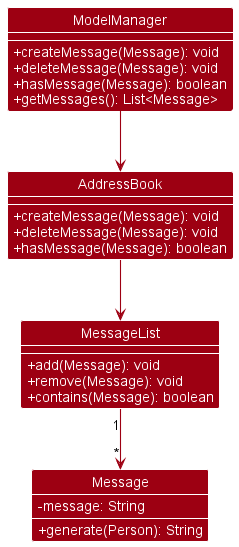
Creation and deletion are exposed in the Model interface as Model#createMessage, Model#deleteMessage, while message generation is exposed in Message as Message#generate.
The following class diagram shows how messages are implemented:
Given below is an example usage scenario of message generation
Step 1. The user creates a message template. A new Message object is created in CreateMessageParser. Then, CreateMessageCommand#execute() calls ModelManager#createMessage(), which calls AddressBook#createMessage(), which adds the message into AddressBook#messages
message create Hello {name}, long time no see! Are you free tomorrow?
Step 2: The user generates a message template for Bob (id=4 in the list), an early-stage client. In GenerateMessageCommand#execute(), {name} is replaced with the target person’s fullName.
message generate 4 1
Hello Bob, long time no see! Are you free tomorrow? I’d like to share something exciting with you!
Step 3: The user realizes his first attempt at a pitch isn’t working well, so they delete the message from the address book. DeleteMessageCommand#execute() calls ModelManager#deleteMessage(), which calls AddressBook#deleteMessage(), which deletes the message from AddressBook#messages
message delete 1
Design considerations:
-
Aspect: Allow editing:
-
Alternative 1 (current choice): Don’t allow editing
-
Pros: Simpler command set, easier to implement, messages templates are not frequently edited
-
Cons: Less convenient when user actually wants to edit message templates
-
-
Alternative 2: Allow editing
-
Pros: (Slightly) more convenient
-
Cons: More complicated command set
-
-
Tag command
Implementation
The proposed implementation for Tags is similar to that of other details of Person.
However, it is important to note that a tag needs to be created before it can be used.
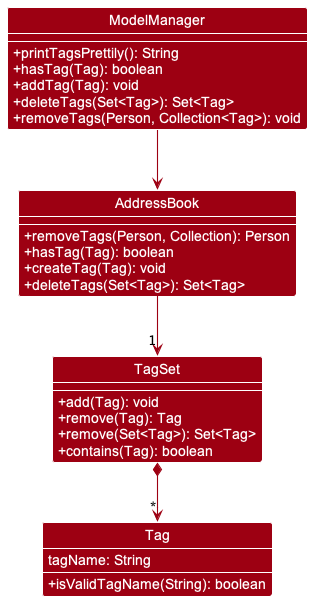
Firstly we include a tag package under seedu/address/model.
This package will contain a tag class with all details about a tag, namely its Regex requirements and
the string which is the remark itself. The package also contains a TagSet class which stores all
tags created under a set.
The following class diagram illustrates how Tag is implemented:
Note that a Tag field is optional when adding a Person entry into the AddressBook. Hence, the default value for a Tag is an empty String.
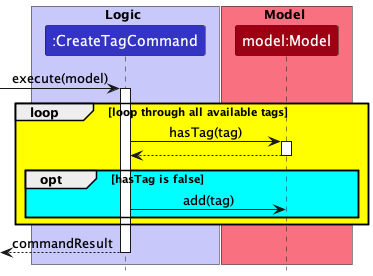
We can create tags using the tag create command. For example, tag create friends.
The following sequence diagram illustrates the mechanism behind creating a tag:
- Upon executing the CreateTag Command, all the tags passed in by the user are passed through a loop to check if they already exist, via
Model#hasTag(tag). - In the event that they exist, they will be stored in a list to inform the user later.
- In the event that it does not exist, it will be created by calling
Model#add(tag). - If there were existing tags being passed in by the user, a message to notify the user will be generated out and printed along the success message.
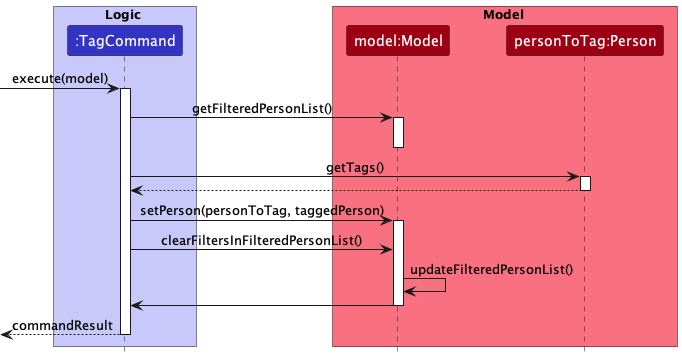
Now that we have created a tag, we can tag a client using the tag command. For example, tag 1 friends.
The sequence diagram below illustrates how tagging works:
- Upon executing the Tag Command, the
model’sgetFilteredPersonList()is called to obtain the list of users. - With the list of users, we are now able to identify the client to tag. We then obtain the tags he/she currently have via
Person#getTags(). - Now we can add the new tags to this particular client.
- Next, we call
Model#setPerson(personToTag, taggedPerson)to update the client’s tags. - Lastly, we call
Model#clearFiltersInFilteredPersonList()to update our list of users.
We can also remove tags from a user using the tag remove command. For example, tag remove 1 friends.
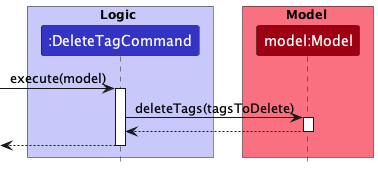
To remove all instances of a tag, we can use the tag delete command. For example, tag delete friends.
The following sequence diagram describes how the deletion of tags is done:
- Upon executing the DeleteTag Command, the command calls the
model’s deleteTags method to delete the tags.
Design considerations:
Aspect: How tags can be implemented:
-
Alternative 1 (current choice): Using a separate set of commands labelled
tag.-
Pros:
- A cleaner design as tags, unlike remarks are elements of a set, rather than a String.
-
Cons:
- Forces the creation of a few unique commands. Not user-friendly as the user is expected to memorize all commands.
-
-
Alternative 2: Building on top of the
addandeditcommands.- Pros:
- It allows a more concise set of operations.
- Cons:`
-
addandeditcommands will be slightly messier and may contain ambiguities. - Not user-friendly. The user will be forced to re-type all the current tags the client possesses if they wish to add or edit one of the many tags the client possesses.
-
- Pros:
Filter Command
Implementation
The filtercommand provides a way for users to search for clients in Rapportbook. It extends from the Command class and results in an update of the FilteredList<Person> filtered list of the model.
The following commands are provided:
-
filter list— Lists all applied filters -
filter [n=NAME,...] [t=TAG,...]— Filter for clients with the specified names and tags -
filter clear [n=NAME,...] [t=TAG,...]— Removes filters that were previously applied with the specified names or tags
The command utilizes the FilterCommandPredicate class to aggregate the filters specified and handle the filtering. FilterCommandPredicate is created during parsing when filter commands are executed. The following is the sequence diagram for parsing of the filter command.
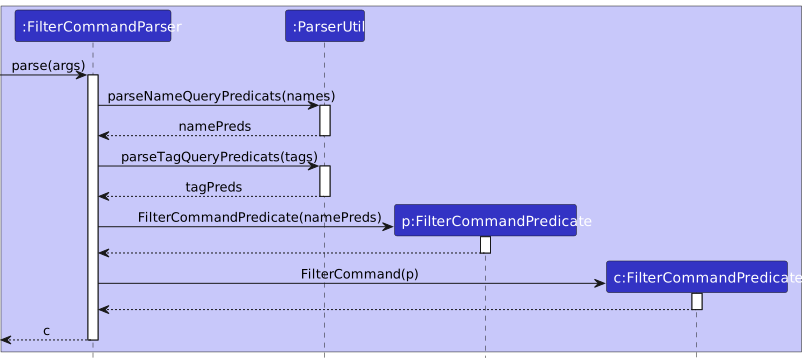
Adding and removing filters are exposed in the Model through the Model#addNewFilterToFilteredPersonList and Model#removeFilterFromFilteredPersonList methods. Additionally, there is also the Model#clearFiltersInFilteredPersonList method to clear all filters.
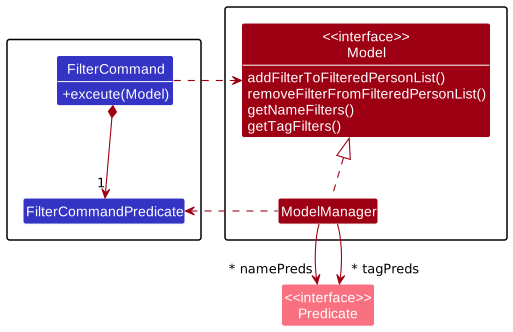
Predicates of each type of filter (name and tags) are stored in separate sets in the ModelManager class. Adding a filter will add predicates to the sets and removing filters will remove them from the sets. To update the FilteredList with the updated filters, each set of predicate will be reduced with an OR operation, and the resulting predicate from each set will be reduced with an AND operation.
The following is a sequence diagram of a filter command. This diagram applies to both filter clear and filter list except that in filter clear, Model#clearFiltersInFilteredPersonList is called and filter list does not change the the FilteredList of the model.
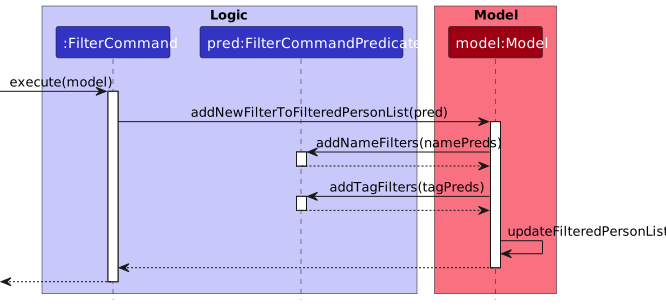
Given below is an example usage scenario of filtering
Step 1: The user wants to filter the for he tagged as rich and fun.
filter t=rich,fun
Step 2: In the list returned, the user notices the names, Bob, Alan, which he has interests in. He can filter for them, so that they appear beside each other.
filter n=bob,alan
Step 3: After looking through their details, the user wants to look at other rich and fun clients in his contact. To do this, he can clear the name filters.
filter clear n=bob,alan
Design considerations:
Aspect: How filters are reduced:
-
Alternative 1 (current choice): filters of the same type are reduced with
ORand filters of different types are reduced withAND.-
Pros:
-
Simple to implement
-
Follows the same filtering pattern used by most websites
-
-
Cons:
- It might be unintuitive for the user to see the list expanding after a new filter is applied.
-
-
Alternative 2: filters in the same command are reduced with
ORand filters in separate commands are reduced withAND.-
Pros:
- Provides a lot of flexibility for the user
-
Cons:
-
Difficult to test as there are many different cases
-
Difficult to implement clearing of filters in a sensible and intuitive manner
-
-
Show command
Implementation
The show command allows the user to target a single client so that details about that client can be changed easily.
To facilitate the show command, a TargetPerson class is created to store the target Person. Methods to store and retrieve the TargetPerson are exposed in the Modelinterface. Storing the Person object of interest in a separate class allows it to be retrieved easily for later use.
The following class diagram shows how the TargetPerson is implemented:
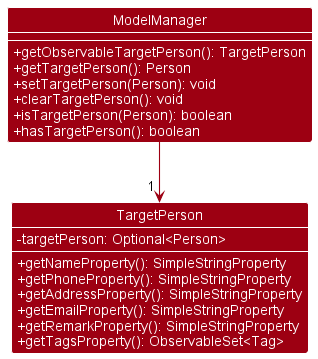
Commands that integrates with the show command includes:
-
edit -
tag -
reminder
Given below is an example usage scenario of show command
Step 1: The user types “show 1” to target the client at index 1 of the current list.
show 1
Step 2: The user edits the current target details, without the need to specify an index.
edit n=Alexis Yeoh
Step 3: The user tags the current target with the tag friends, without the need to specify an index.
tag friends
Design considerations:
-
Aspect: How to access the
TargetPerson:- Alternative 1 (current choice): Allow the index to not be specified
- Pros:
- The user does not have to provide an index (less to type).
- Cons:
- Implementation will have to account for no index provided for the various commands.
- Pros:
- Alternative 2: Index 0 to denote
TargetPerson- Pros:
- (Slightly) Easier to implement.
- Cons:
- User has to provide an index (more to type).
- Pros:
- Alternative 1 (current choice): Allow the index to not be specified
Reminders
Implementation
The remindercommand provides a way for users to add reminders for clients in Rapportbook.
The following commands are provided:
-
reminder [INDEX] d=DESCRIPTION dt=YY-M-D H:m— Adds a reminder for the specified client if INDEX is provided, otherwise adds a reminder for the target client shown using theshowcommand. -
reminder delete INDEX— Deletes a reminder from the displayed reminder list using the reminder index. -
reminder clear— Clears all reminders from the displayed reminder list.
Given below is the class diagram for reminders. ReminderList will sort Reminder objects by the earliest date and time of a reminder.
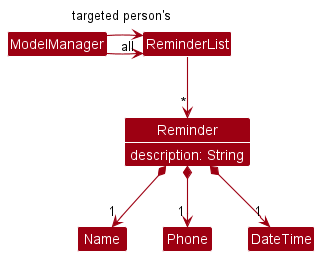
Note: As of now, each Reminder object contains the Name and Phone objects which are used as foreign keys to identify which Person object the Reminder belongs to. This is a workaround and we may implement unique primary keys for Person in the future.Given below is an example usage scenario of reminder
Step 1: Clear all reminders in the currently displayed reminder list.
reminder clear
Step 2: Create a reminder for the client at index 1 of the currently displayed reminder list with description Zoom meeting, date 30 November 2022 and time 11:00 AM.
reminder 1 d=Zoom meeting dt=22-11-30 11:00
Design considerations:
-
Aspect: Storage for reminders:
-
Alternative 1 (current choice): Store reminders in a separate JSON file.
-
Pros:
- Reduced data coupling between contacts and reminders — Corrupted data in reminders will not cause the application to fail to load the address book data.
-
Cons:
-
More tedious to implement.
-
An extra file the user needs to keep track of when transferring data.
-
-
-
-
Alternative 2: Store all reminders in the address book JSON file
-
Pros:
- Easier to implement.
-
Cons:
- Data coupling — A pre-existing database may fail to load due to changes in how address book or reminders data are stored, and data coupling will increase the amount of data that fails to load.
-
Motivational quotes
Implementation
As an encouragement, Rapportbook will show a motivational quote on the starting page of Rapportbook. The quote is randomly selected from a list of 300 quotes, and will not change until Rapportbook is restarted.
The quotes are stored as a static list, in the QuoteList class. As this class has only static variables and methods, it should not be instantiated and hence does not have a constructor. The following is the class diagram for this feature.
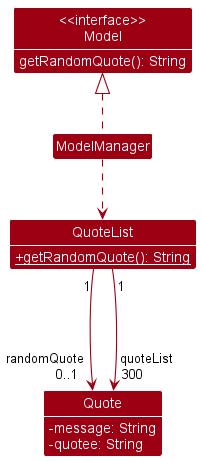
To access a quote, the class provides the QuoteList#getRandomQuote() method which will return a random quote from the quote list. Once the getRandomQuote() method has been called, the quote returned will be stored as a static variable, which will be used as the return value for subsequent calls.
Design considerations:
-
Aspect: How the quotes are stored.
-
Alternative 1 (current choice): Stored as a static variable in a class
-
Pros:
- Easy to implement.
-
Cons:
- Every quote will be loaded into memory even though only 1 quote is used.
-
-
Alternative 2: Stored in a JSON file
-
Pros:
- Reduces memory use.
- Allows users to add their own quotes.
-
Cons:
- High effort for a small feature.
-
-
Documentation, logging, testing, configuration, dev-ops
Appendix: Requirements
Product scope
Target user profile:
-
new financial advisor
-
has a need to manage a significant number of contacts
-
prefer desktop apps over other types
-
can type fast
-
prefers typing to mouse interactions
-
is reasonably comfortable using CLI apps
-
does not like repetitive work
-
prefers to have minimal traveling expenses
-
likes motivational quotes
Value proposition:
-
manage contacts faster than a typical mouse/GUI driven app
-
keep track of the user’s contacts and meeting schedule easily, but communication with contacts is not covered.
-
stay motivated to engage with his clients
User stories
Priorities: High (must have) - * * *, Medium (nice to have) - * *, Low (unlikely to have) - *
| Priority | As a … | I want to … | So that I can… |
|---|---|---|---|
* * * |
new user | see usage instructions | refer to instructions when I forget how to use the App |
* * * |
financial advisor | add client information | |
* * * |
financial advisor | delete client information | remove entries that I no longer need |
* * * |
financial advisor | modify a client entry easily | ensure that client information is up to date |
* * * |
financial advisor | filter my clients by name | locate details of clients without having to go through the entire list |
* * * |
financial advisor | be reminded of client meetings | be punctual and save time on planning. |
* * |
financial advisor | easily generate commonly used messages | save time communicating with my clients. |
* * |
financial advisor | classify my clients with different tags | know who to prioritize |
* * |
financial advisor | filter my clients based on tags assigned to them | access relevant client data easily |
* * |
financial advisor | view clients from a certain demographic | get a better overview of what my client base is like |
* * |
financial advisor | get things done fast with minimal typing | save time |
* * |
financial advisor | remember details that clients tell me about their lives | use them to form an emotional connection with clients |
* * |
financial advisor | keep track of my client’s phone number and address | contact them easily |
* * |
financial advisor | leave remarks of my clients | remember important details unique to each client |
* |
financial advisor | sort clients by name and tag | locate a client easily |
* |
financial advisor | get motivated | power through the day’s tasks |
Use cases
(For all use cases below, the System is the Rapportbook and the Actor is the user, unless specified otherwise)
Use case: List contacts
-
User requests to list contacts.
-
Rapportbook shows a list of contacts. Use case ends.
Use case: Add a contact
MSS
-
User requests to add a contact and provides details of contacts.
-
Rapportbook indicates that contact has been added. Use case ends.
Extensions
- 1a. User does not input the required details for the contact.
- Use case resumes at step 1.
Use case: Delete a contact
MSS
-
User lists contacts.
-
User requests to delete a specific contact in the list.
-
Rapportbook deletes the contact. Use case ends.
Extensions
-
1a. The list is empty. Use case ends.
-
2a. The given index is invalid.
- 2a1. Rapportbook shows an error message.
- Use case resumes at step 2.
Use case: Edit a contact
MSS
-
User lists contacts.
-
User requests to edit a specific contact in the list by specifying fields and their updated values.
-
Rapportbook edits the contact based on what the user specified. Use case ends.
Extensions
-
1a. The list is empty. Use case ends.
-
2a. The given index is invalid.
- 2a1. Rapportbook shows an error message.
- Use case resumes at step 2.
-
2b. No fields were specified
- 2b1. Rapportbook shows an error message.
- Use case resumes at step 2.
-
2c. Updated values is not in the right format.
- 2c1. Rapportbook shows an error message.
- Use case resumes at step 2.
-
2d. No index was specified but there is a contact shown.
- Use case resumes at step 3.
-
2e. No index was specified and there is no contact shown.
- Rapportbook shows an error message.
- Use case resumes at step 2.
Use case: List filters applied
MSS
-
User requests to show a list of filters already applied.
-
Rapportbook displays a list of filters applied.
Use case ends
Extensions
-
1a. No filters are applied.
- 1a1. Rapportbook shows a message to indicate there are no filters applied.
Use case: Filter clients
MSS
-
User requests to filter clients of a certain tag and/or name.
-
Rapportbook shows a list of clients that contains the tag and name specified in the filter query.
Use case ends.
Extensions
- 1a. Some filters were previously applied.
- 1a1. Rapportbook shows a list of clients that match the previous future and the current filter.
- Use case ends.
Use case: Clear filters
MSS
-
User requests to show a list of filters already applied.
-
Rapportbook displays a list of filters applied.
-
User requests to clear filters that were originally applied.
-
Rapportbook shows a list of contacts without the filters applied.
Use case ends.
Extensions
-
3a. Some filters specified were not previously applied.
-
3a1. Rapportbook only clears the filters that were applied.
-
Use case resumes at step 3
-
Use case: Show contact
MSS
-
User lists contacts.
-
User requests to show a specific contact in the list.
-
Rapportbook displays the contact in a separate panel for the user.
Use case ends.
Extensions
-
1a. The list is empty.
Use case ends.
-
2a. The given index is invalid.
-
2a1. Rapportbook shows an error message.
-
Use case resumes at step 2.
-
Use case: Create tag(s)
MSS
-
User requests to create a certain tag or multiple tags.
-
Rapportbook creates the corresponding tag(s).
-
Rapportbook shows success message. Use case ends.
Extensions
-
1a. At least one of the specified tag(s) already exist.
-
1a1. Rapportbook shows a message indicating that the tag(s) already exists.
-
1a2. Rapportbook creates any tags that does not exist.
-
Use case resumes at step 1.
-
Use case: Delete tag(s)
MSS
-
User requests to delete a certain tag or multiple tags.
-
Rapportbook deletes the corresponding tag(s) and removes deleted tags from users.
-
Rapportbook shows success message.
Use case ends.
Extensions
-
1a. At least one of the specified tag(s) does not exist.
-
1a1. Rapportbook shows a message indicating that the tag(s) does not exists.
-
1a2. Rapportbook deletes tags that exist.
-
Use case resumes at step 1.
-
Use case: List tag(s)
MSS
-
User requests to list all tags in Rapportbook.
-
Rapportbook shows a list of tags.
Use case ends.
Extensions
-
1a. No tags exist in Rapportbook.
-
1a1. Rapportbook shows a message indicating no tags exist in Rapportbook.
-
Use case ends.
-
Use case: Add tag(s) to contact
MSS
-
User lists contacts.
-
User requests to tag a specific contact in the list with certain tag(s).
-
Rapportbook shows success message. Use case ends.
Extensions
-
1a. The list is empty.
Use case ends.
-
2a. The given index is invalid.
-
2a1. Rapportbook shows an error message.
-
Use case resumes at step 2.
-
-
2b. At least one of the specified tag(s) do not exist.
-
2b1. Rapportbook shows an error message.
-
Use case resumes at step 2.
-
-
2c. Contact already tagged with certain tag(s) specified but not all the tag(s) specified.
-
2c1. Rapportbook tags the contact with the missing tag(s).
-
2c2. Rapportbook shows a message indicating which tag(s) the contact already has and which tag(s) were added.
Use case resumes at step 2.
-
-
2d. Contact already tagged with all tag(s) specified.
-
2d1. Rapportbook shows a message indicating that no tags were added.
Use case resumes at step 2.
-
Use case: Remove tag(s) from contact
MSS
-
User lists contacts.
-
User requests to remove certain tag(s) from a specific contact in the list.
-
Rapportbook shows success message.
Use case ends.
Extensions
-
1a. The list is empty. Use case ends.
-
2a. The given index is invalid.
- 2a1. Rapportbook shows an error message.
- Use case resumes at step 2.
-
2b. At least one of the specified tag(s) do not exist.
- 2b1. Rapportbook shows an error message.
- Use case resumes at step 2.
-
2c. Contact already has at least one of the tag(s) specified.
-
2c1. Rapportbook shows a message indicating which specified tag(s) the contact already has.
-
Use case resumes at step 2.
-
Use case: Generate message templates
MSS
-
User creates a new message template
-
User lists their message templates
-
User generates a personalized message for the client at index 1 (say, Alice)
-
User generates a personalized message for the client at index 2 (say, Bob)
Use case ends.
Extensions
-
3a. There is no client with index 1.
-
3a1. Rapportbook shows an error message.
-
Use case resumes at step 4.
-
-
4a. There is no client with index 2.
-
4a1. Rapportbook shows an error message.
-
Use case ends
-
Use case: Reminder creation
MSS
-
User lists contacts.
-
User requests to add a reminder to a specific contact in the list.
-
Rapportbook shows success message. Use case ends.
Extensions
- 1a. The list is empty. Use case ends.
-
2a. The given index is invalid.
- 2a1. Rapportbook shows an error message.
- Use case resumes at step 2.
-
2b. The reminder already exist for the contact, i.e. same description, date and time.
- 2b1. Rapportbook shows an error message.
- Use case resumes at step 2.
-
2c. The description or date and time is invalid.
- 2c1. Rapportbook shows an error message.
- Use case resumes at step 2.
Use case: Reminder deletion
MSS
-
User goes to home page to view the list of reminders.
-
User requests to delete a reminder in the reminders list.
-
Rapportbook shows success message. Use case ends.
Extensions
- 1a. The list is empty. Use case ends.
-
1b. User shows a specific contact.
- 1b1. Rapportbook shows the list of reminders for the chosen contact.
- 1b2. The list is not empty.
- Use case resumes at step 2.
-
1c. User shows a specific contact.
- 1c1. Rapportbook shows the list of reminders for the chosen particular contact.
- 1c2. The list is empty.
- Use case ends.
-
2a. The given index is invalid.
- 2a1. Rapportbook shows an error message.
- Use case resumes at step 2.
Use case: Clear reminders
MSS
-
User goes to home page to view the list of reminders.
-
User requests to clear the reminders list.
-
Rapportbook shows success message. Use case ends.
Extensions
-
1a. User shows a specific contact.
- 1a1. Rapportbook shows the list of reminders for the chosen contact.
- Use case resumes at step 2.
Use case: Return to home page
-
User requests to return to the home page.
-
Rapportbook displays the home page to the user. Use case ends.
Use case: View motivational quote
-
User accesses the home page of Rapportbook.
-
Rapportbook shows a motivational quote on the home page. Use case ends.
Use case: Request help manual
-
User requests help for application usage.
-
Rapportbook opens another window that contains a link to the help manual. Use case ends.
Use case: Exit application
-
User requests to exit the application.
-
Rapportbook closes all windows and exits gracefully. Use case ends.
Non-Functional Requirements
Constraints
- Rapportbook must be able to be packaged into a single executable JAR file that is less than 100MB.
Data requirements
-
Data should be stored locally and in a human editable text file.
-
No database managed system should be used.
Technical requirements
-
Rapportbook should work on any mainstream OS as long as it has Java
11or above installed. -
Rapportbook should work on 64-bit environments.
-
Rapportbook should work in an offline environment.
-
Rapportbook should work without requiring an installer.
Performance requirements
-
Rapportbook should be able to hold up to 1000 contacts without a noticeable delay in performance for typical usage.
-
Rapportbook should be able to load and store up to 1000 contacts without a noticeable delay in performance.
-
Rapportbook should be able to respond to user requests in less than 1 second when there are less than 1000 contacts.
Process requirements
-
Rapportbook development schedule:
-
v1.1 by 29 September 2022, Thursday, Week 7
-
v1.2 by 13 October 2022, Thursday, Week 9
-
v1.3 by 27 October 2022, Thursday, Week 11
-
v1.4 by 3 November 2022, Thursday, Week 12
-
-
Rapportbook code should follow the Object-oriented paradigm primarily.
Quality requirements
-
A user with above average typing speed should be able to accomplish most tasks faster using commands than using the mouse.
-
Rapportbook GUI should work well for standard screen resolutions 1920x1080 and higher, and for screen scales 100% and 125%.
-
Rapportbook GUI should be usable for screen resolutions 1280x720 and higher, and, for screen scales 150%.
Project scope
-
Rapportbook is a single user product.
-
Rapportbook does not handle communication with clients.
-
Rapportbook does not send notifications to the user.
Noteworthy points
-
Rapportbook features should be easy to test.
-
Rapportbook should not rely on external APIs to work.
Glossary
-
Mainstream OS: Windows, Linux, Unix, OS-X.
-
Client: A person that is using the services of our target user.
-
Contact: A client profile containing their name, phone number, and other relevant information.
-
Field: A piece of information in a contact (e.g. name, phone number).
-
Entry: A contact.
-
Private contact detail: A contact detail that is not meant to be shared with others.
-
Remark: Text that describes a client.
-
Message: A text template to generate frequently used messages to communicate with clients.
Appendix: Instructions for manual testing
Given below are instructions to test the app manually.
Note: These instructions only provide a starting point for testers to work on;
testers are expected to do more exploratory testing.
Launch and shutdown
-
Initial launch
-
Download the jar file and copy into an empty folder
-
Double-click the jar file Expected: Shows the GUI with a set of sample contacts. The window size may not be optimum.
-
-
Saving window preferences
-
Resize the window to an optimum size. Move the window to a different location. Close the window.
-
Re-launch the app by double-clicking the jar file.
Expected: The most recent window size and location is retained.
-
Adding a client
-
Adding a client
-
Prerequisite: The tag
friendsexists in Rapportbook. -
Test case:
add n=Laufey p=98980184 e=laufey@u.nus.edu a=123,Clementi r=janitor t=friendsExpected: A client named Laufey is successfully added. Details of the added client will be displayed in the status message.
-
Test case:
add p=98980184 e=laufey@u.nus.edu a=123,Clementi r=janitor t=friendsora p=98980184 e=laufey@u.nus.edu a=123,Clementi r=janitor t=friendsExpected: No client is added. Error details shown in the status message. Command box remains the same.
-
Editing a client
-
Editing a client by specifying their index.
-
Prerequisites:
-
The tags specified (eg.
t=friends)in the command must exist in Rapportbook. -
There are clients in the Rapportbook.
-
-
Test case:
edit 1 n=Laufey p=0162626003 r=Bluebirds in the spring t=friendsore 1 n=Laufey p=0162626003 r=Bluebirds in the spring t=friendsExpected: First client is edited with the information specified. Fields not specified will not be changed.
-
Test case:
edit 1Expected: No client is edited. Error details shown in the status message. Command box remains the same.
-
-
Editing a client with the
showcommand.-
Prerequisites:
-
The tags specified (eg.
t=friends)in the command must exist in Rapportbook. -
A client is being shown eg.
show 1.
-
-
Test case:
edit n=Laufey p=0162626003 r=Bluebirds in the spring t=friendsore n=Laufey p=0162626003 r=Bluebirds in the spring t=friendsExpected: Client shown is edited with the information specified. Fields not specified will not be changed.
-
Deleting a client
-
Deleting a client by specifying their index.
-
Prerequisites: There are clients in Rapportbook.
-
Test case:
delete 1ord 1
Expected: First client is deleted from the list. Details of the deleted contact shown in the status message. -
Test case:
delete 0
Expected: No client is deleted. Error details shown in the status message. Command box remains the same. -
Other incorrect delete commands to try:
delete,delete x,...(where x is larger than the list size)Expected: Similar to previous.
-
Tagging
-
Creating tags
-
Test case:
tag create friendsort c friendsExpected: The tag
friendswill be created in Rapportbook. A message will be shown indicating the tag created. -
Test case:
tag create 123Expected: No tags will be created. Error details shown in the status message. Command box remains teh same
-
-
Deleting tags
-
Prerequisite: The tag
friendsexists in Rapportbook. -
Test case:
tag delete friendsort d friendsExpected: The tag
friendwill be deleted from Rapportbook, and all clients that are tagged withfriendswill lose the tag. A message will be shown indicating successful deletion. -
Test case:
tag delete abcExpected: No tags will be deleted. A message will be shown indicating the tag does not exist.
-
-
Listing tags
-
Test case:
tag listort lExpected: All tags in Rapportbook will be listed in the message box.
-
-
Adding tags to clients
-
Prerequisites:
-
There are clients in Rapportbook.
-
The tag
friendsexists in Rapportbook.
-
-
Test case:
tag 1 friendsort 1 friendsExpected: First client will be tagged with
friends. A message will be shown indicating success.
-
-
Removing tags from clients
-
Prerequisites:
-
There are clients in Rapportbook.
-
The first client is tagged
friends.
-
-
Test case:
tag remove 1 friendsort r 1 friendsExpected: First client will no longer be tagged with
friend. A message will be shown indicating success.
-
Filtering
-
Filtering
-
Test case:
filter n=Laufey t=friendsorf n=Laufey t=friendsExpected: The list will only show clients named Laufey and tagged
friends. A message will be shown indicating successful filtering.
-
-
Listing filters
-
Test case:
filter listorf lExpected: A list of filters currently applied will be shown in the message box.
-
Test case:
tag delete abcExpected: No tags will be deleted. A message will be shown indicating the tag does not exist.
-
-
Clearing filters
-
Prerequisite:
filter n=Laufey t=friendshas been applied. -
Test case:
filter clearorf cExpected: All clients will be shown. Message box will display the number of clients in the list.
-
Test case:
filter clear t=friendsExpected: All clients containing the name
laufeywill be shown. Message box will display the number of clients in the list.
-
Messages
-
Creating messages
-
Test case:
message create Hello, {name}orm c Hello, {name}Expected: The message box will indicate successful creation of the message.
-
-
Listing messages:
-
Test case:
message listorm lExpected: The right panel will show the list of messages created.
-
-
Generating messages
-
Prerequisites:
-
Messages have been created.
-
There are clients in Rapportbook.
-
-
Test case:
message generate 1 2orm g 1 2Expected: The message box will display that the second message has been generated for the first client. The message generated will be copied to your clipboard.
-
-
Deleting messages
-
Prerequisites:
-
Messages have been created.
-
There are clients in Rapportbook.
-
-
Test case:
message delete 1orm d 1Expected: The message will be deleted from Rapportbook. The message box will indicate successful deletion.
-
Reminders
-
Creating reminders
-
Prerequisites:
- There are clients in Rapportbook.
-
Test case:
reminder 1 d=Zoom meeting dt=22-11-30 11:00orr 1 d=Zoom meeting dt=22-11-30 11:00Expected: A reminder will be created for the first client. A message will be shown indicating success.
-
-
Deleting reminders
-
Prerequisites:
-
Reminders have been created.
-
There are clients in Rapportbook.
-
-
Test case:
reminder delete 1orr d 1Expected: The reminder will be deleted from Rapportbook. The message box will indicate successful deletion.
-
-
Clearing reminders
-
Prerequisites:
-
Reminders have been created.
-
There are clients in Rapportbook.
-
-
Test case:
reminder clearorr cExpected: The message box will display that reminders have been cleared.
-